If you own a Mercedes-Benz in South Africa, you’ve probably heard the term “NTG” when looking into infotainment upgrades, CarPlay/Android Auto retrofits, or replacement radios. But what does NTG actually mean, and how do you know whether your car is NTG 4, 4.5, 5.0, 5.5, or even MBUX?
This guide will explain it in plain English, with South African examples, so you can identify your NTG system before spending money on the wrong upgrade.
What is NTG?
NTG stands for “New Telematics Generation” — Mercedes-Benz’s way of naming each generation of its infotainment and navigation systems.
Every few years, Mercedes releases a new NTG system with better screens, faster menus, more features (like Bluetooth, CarPlay, or Android Auto), and a different dashboard design.
Why it matters in South Africa:
- Many SA drivers import their cars from Japan or the UK, where systems differ.
- Fitment centres in Johannesburg, Cape Town, and Durban will always ask which NTG you have before booking an upgrade.
- Ordering the wrong unit online is one of the biggest headaches for Mercedes owners here.
How to Identify Your NTG System
1. Check the Model Year
Here’s a general breakdown with popular South African models:
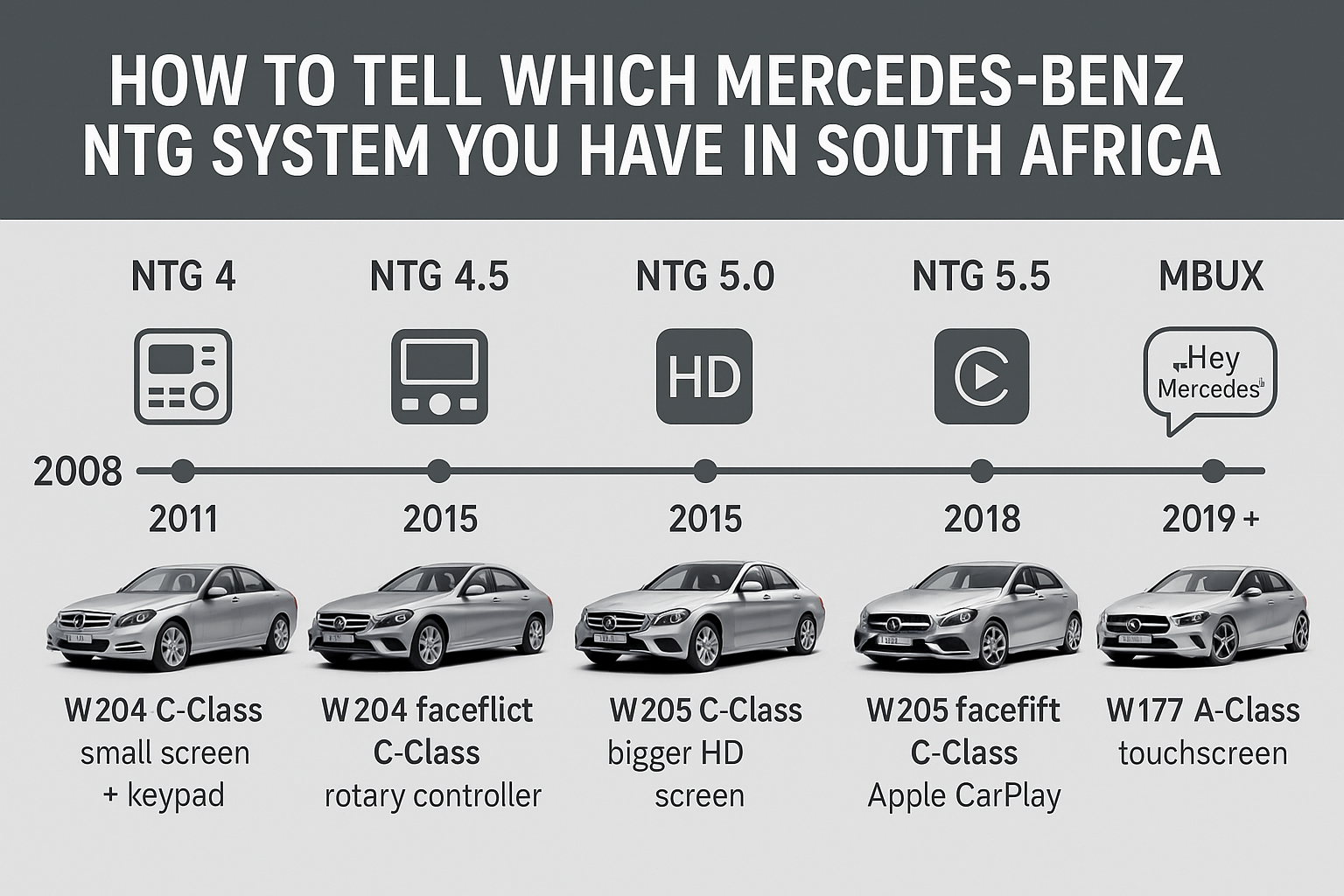
- NTG 4 (2008–2011)
- Found in: W204 C200 Kompressor, early W212 E-Class.
- Distinctive for its small screen and separate number keypad.
- NTG 4.5 (2011–2015)
- Found in: W204 facelift C220 CDI, W212 facelift E250, W218 CLS.
- Faster menus, fewer buttons, rotary control knob.
- NTG 5.0 (2015–2018)
- Found in: W205 C200, W222 S-Class, X253 GLC 250.
- Bigger high-resolution screens, cleaner graphics.
- NTG 5.5 (2018–2020)
- Found in: W205 facelift C-Class, facelifted GLC, GLE.
- Widescreen design, supports Apple CarPlay & Android Auto.
- MBUX (2019 onwards)
- Found in: W177 A-Class, H247 GLA, new GLE.
- Touchscreen, AI voice assistant (“Hey Mercedes”), widescreen cockpit.
2. Look at the Dashboard Layout
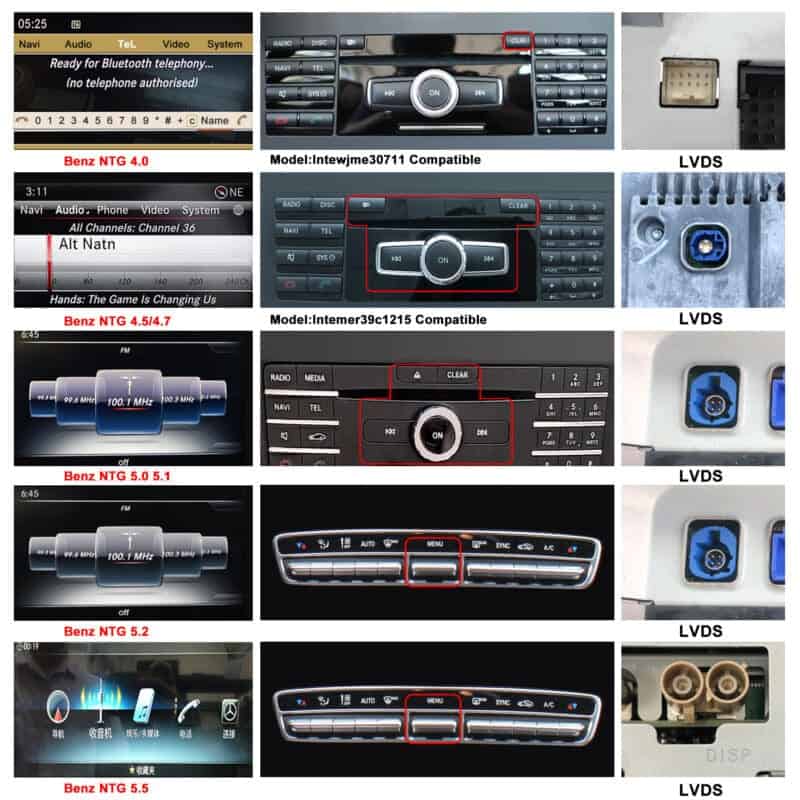
- NTG 4: Small screen with keypad on the right.
- NTG 4.5: Cleaner design, fewer buttons.
- NTG 5.0: Bigger display with HD menus.
- NTG 5.5: Widescreen with CarPlay icon.
- MBUX: Tablet-style touchscreen, no keypad at all.
3. Check the Menu Style
- NTG 4 → Blue/black, simple menus.
- NTG 4.5 → Faster, slightly modernised.
- NTG 5.0 → High-res graphics, smoother transitions.
- NTG 5.5 → Widescreen menus, CarPlay/Android Auto options.
- MBUX → Full-colour, touchscreen, app-style icons.
4. Use Your VIN
If you’re still unsure, enter your VIN into a Mercedes-Benz VIN decoder online. It will tell you exactly which NTG system your car came with.
Quick Reference Table (South Africa Edition)
| NTG Version | Years | Popular SA Models | Key Features |
|---|---|---|---|
| NTG 4 | 2008–2011 | W204 C200 Kompressor, W212 E-Class | Keypad, small screen |
| NTG 4.5 | 2011–2015 | W204 Facelift C220 CDI, W212 E250, CLS W218 | Faster menus, fewer buttons |
| NTG 5.0 | 2015–2018 | W205 C200, W222 S-Class, X253 GLC 250 | Bigger HD screen |
| NTG 5.5 | 2018–2020 | W205 Facelift C-Class, GLC Facelift, GLE | Widescreen, CarPlay/Android Auto |
| MBUX | 2019+ | W177 A-Class, H247 GLA, new GLE | Touchscreen, “Hey Mercedes” |
Where to Buy Upgrades in South Africa
At MVA Spares, we specialise in Android upgrade units for Mercedes-Benz vehicles. If you’re looking to modernise your infotainment system, we stock:
- Mercedes W205 (C-Class) NTG 4.5 & NTG 5.0 Android units
- Mercedes W176 (A-Class) NTG 4.5 & NTG 5.0 Android units
- Other Mercedes-Benz Android head units tailored for various NTG systems
These Android units bring Apple CarPlay, Android Auto, Bluetooth, and modern apps straight to your dashboard while keeping your original Mercedes controls functional.
https://mvaspares.co.za/product-category/car-dvd-gps/
Final Word
In South Africa, identifying your NTG system is the difference between a smooth upgrade and weeks of frustration.
✅ Check your model year.
✅ Compare your dashboard layout.
✅ Look at your menu graphics.
✅ Confirm with your VIN.
And when you’re ready to upgrade, remember — MVA Spares has the right Android head unit for your NTG system.